Features
Everything between the sale and the router
Channel Letter Design Studio is channel letter software for the whole job: the artwork, the layout, the lighting, the checks, the drawings and the files your router cuts.

Text & artwork
Start from the words or the logo
Every sign starts from typed text or the customer’s artwork, or both.
- Nine fonts: Montserrat, Roboto, Oswald, Bebas Neue, Anton, Roboto Slab, Tinos, Righteous and Quicksand
- Text runs across, up the wall, or turned at an angle
- Artwork from DXF, SVG, PDF, Illustrator (.ai) or EPS, scaled to a letter height
- Up to five elements on a sign, each with its own style, colors, LED module and raceway
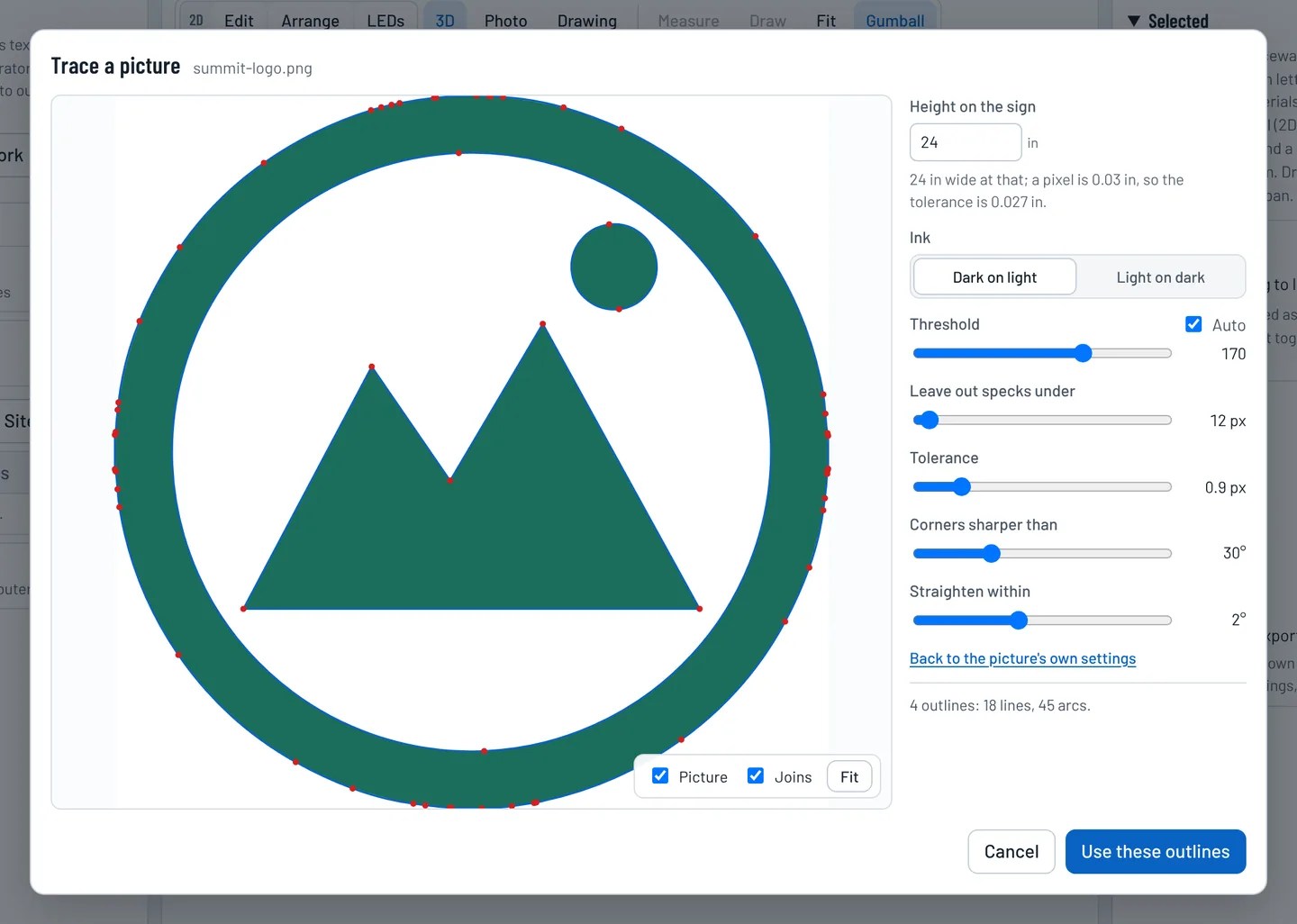
Picture tracing
Only have a picture? Trace it.
Open a PNG, JPEG, WebP, GIF or BMP and the studio traces it into outlines. The threshold, speck size, tolerance and corners are set for you and can be adjusted while you watch.
- Lines and arcs, not thousands of tiny segments: clean code for the router
- Dark on light or light on dark
- A PDF or SVG that is only a picture is traced too
Letter styles
Five styles, one sign
Pick a style for the sign, or one for each element. A style template keeps your shop’s returns, colors, materials and largest letter.


Layout
Arrange the sign by hand
Drag letters and raceways into place; they snap to each other with guides. A gumball moves and turns what you pick.
- Raceways across, vertical or turned with the letters, fitted to the letters in one click
- Or mount on the wall with standoffs
- Measure anything, and draw on artwork: line, trim, split, fillet, chamfer and offset

Lighting
LEDs and power supplies, laid out for you
Modules are placed letter by letter for the module you use. A light map shows bright and dark spots, and you can add, move or remove modules by hand.
- Power supplies counted and loaded to the limit you set
- The sign’s modules and watts on the drawing and in the bill of materials
- Templates for the LED modules your shop buys

Checks
Problems found before they are cut
Every letter is checked as designed and as cut, and each problem links to the letter it is in.
- Strokes narrower than the style allows
- Points sharper than the router can make
- Letters over the style’s largest size
- Mounting holes off the raceway, letters too close together

Fabrication
The details your shop would add by hand
The studio adds what a channel letter needs to be built, and shows each on its own layer.
- Router offsets for your bit, with round, sharp or chamfered corners
- Clips and notches, fastener holes
- Mounting holes and pass-throughs on the raceway, moved by hand if you want
- Drain holes at the low points

3D
See it in 3D before it is built
Turn the sign around and look at every part: faces, returns, trim, backs, standoffs and raceway. Click a letter for its own style, size, materials and colors.
- Marquee bulbs, halo glow and raceway colors as they will look
- Put the sign on a photo of the building, at its true size
- The 3D model exports as an OBJ file

Drawings
A drawing set ready to send
One click makes a PDF drawing set for the customer’s approval and the shop floor.
- Elevation, side view, typical section and specifications
- Your shop’s logo, address, notes and disclaimers in the title block
- Letter sheets with sizes, holes and LED modules
- Letter, Tabloid, ANSI C and D, A4 or A3; a shop copy and a customer copy

Production
Cut files and a bill of materials
Export the files your router and your purchasing need, zipped together.
- Face, return, back and layout DXF, and every layer in one file
- Faces and backs nested on your stock sheets with your largest router bit
- Bill of materials and cut list, on the drawing and as CSV
Customer approval
Approval without the back-and-forth
Send the customer a link to the design. No account and nothing to install: they look, then answer.

What the customer sees
Their sign, ready to approve
One link shows the customer the design as you sent it, on a phone or a computer. Nothing they do changes your design.
- The 3D model to turn, and the drawing’s customer copy
- The sign on their building, when you placed it on a site photo
- Approved, approved with notes, or please revise, signed with their typed name
- Links last 7, 30 or 90 days, or until you turn them off

Where it stands
Know where every design stands
Every design says where it is with its customer, beside its name and on its card.
- Waiting for customer approval, Approved, Approved with notes, or Changes requested
- Told in the studio and by email the moment they answer
- Changed the design? Send the next revision to the same link; earlier answers stay on record

Your shop
Designs and templates, kept for the whole shop
Designs save to your account. Templates make every new design start the way your shop builds.
- Folders, thumbnails, search and a trash can
- Style, raceway, LED module and drawing templates
- Pro plans: the shop’s login open in up to five places at once
See it with your own sign.
Start a 14-day free trial on any plan. Open a customer’s logo and have the drawing set before lunch.